The short version: If phone calls are how customers reach you, your analytics are probably undercounting your best leads. At minimum, track every tap on your phone number as a key event in Google Analytics 4 using Google Tag Manager -- it's free and takes under an hour. If you need to know which calls actually connected and which marketing drove them, add a call tracking service with dynamic numbers. Either way, protect your Google Business Profile phone number while you do it.
Ask most local business owners how their website is performing and they'll tell you about form submissions. Ask how many of their new customers called after visiting the site, and you'll usually get a shrug.
That gap matters. For contractors, law firms, medical offices, home services, and plenty of others, the phone is still where the money happens. Someone in a hurry on their phone doesn't want to fill out a form -- they tap the number. If your reporting only counts forms, your website may be doing far more for you than you realize, and you may be cutting marketing that's actually working.
Level 1: Track Taps on Your Phone Number (Free)
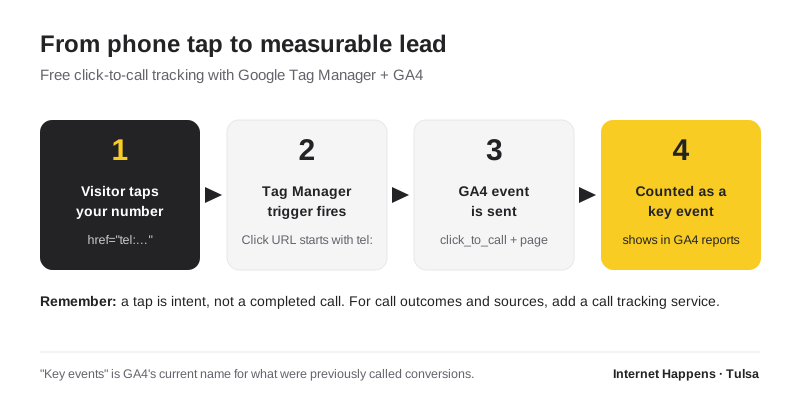
Every phone number on your website should be a tappable link that starts with tel:. On a phone, tapping it opens the dialer. That tap is something you can measure.
Here's how I set it up on my own site using Google Tag Manager and Google Analytics 4. The same approach works on WordPress, hand-coded sites, and most other platforms.
- Make sure every phone number is a real link. Your header, footer, contact page, and calls to action should use
<a href="tel:9185551234">, not plain text. - Install Google Tag Manager on your site if you haven't already, and connect your GA4 measurement ID with a Google Tag.
- Create a trigger. Use a "Just Links" click trigger that fires when the Click URL starts with
tel:. - Create a GA4 event tag -- I call mine
click_to_call-- that fires on that trigger. You can pass the page path along as a parameter so you know which pages drive calls. - Test it in Tag Manager's Preview mode, tap your number, and confirm the event fires. (Tip: some privacy-focused browsers block Tag Manager by default, so test in a standard browser too.)
- Publish the container, then in GA4 mark
click_to_callas a key event -- Google's current name for what used to be called a conversion.
On my own site, I went one step further: every phone tap also sends me an email notification, so I know a lead is likely calling before the phone even rings. That's a small custom addition, but it's been genuinely useful.
Know what you're counting. A tap is intent, not a completed call. Someone might tap and hang up, or tap on a desktop computer where nothing happens. Taps are still an excellent directional signal -- which pages, sources, and campaigns drive people to pick up the phone -- but they aren't a call log.
Level 2: Call Tracking Numbers (When You Need the Full Picture)
If you spend real money on advertising, or you need to know which calls actually connected, how long they lasted, and which campaign produced them, a call tracking service is the next step. These services give you tracking phone numbers that forward to your real line and record where each call came from.
The most useful feature is dynamic number insertion: your website shows a different tracking number depending on how the visitor arrived -- Google Ads, organic search, Facebook, an email campaign -- and swaps it in automatically. Calls from each source are reported separately, and many services can send completed calls back into Google Ads and GA4 as conversions.
Call tracking services typically charge a monthly fee plus usage. For businesses running paid advertising, it's often the only way to know what the ads are really producing.
Don't Break Your Local SEO in the Process
This is where call tracking goes wrong. Your business name, address, and phone number should be consistent across your website, Google Business Profile, and directory listings -- search engines and AI tools use that consistency to trust who you are. Sprinkling tracking numbers everywhere can undermine it.
Ground rules I follow:
- Keep your main business number in your website's code and structured data. Dynamic number insertion should swap the displayed number with JavaScript, leaving your real number in the underlying HTML and schema markup.
- Be careful with your Google Business Profile. Google Business Profile lets you list a primary number and additional numbers. If you use a tracking number there, a common approach is to make the tracking number primary and list your main business number as an additional number so the connection isn't lost. Never change the number on an established profile casually.
- Never put tracking numbers on directory listings. Directories should all show your one real number.
- Keep numbers local. A local Tulsa or Oklahoma City area code looks more trustworthy to a caller than a toll-free number for a local service.
More on keeping your profile healthy in my Google Business Profile guide for Tulsa businesses.
What to Do With the Data
Once calls are tracked, the reports get a lot more honest. A few things to look at monthly:
- Which pages produce the most phone taps? Those pages are earning their keep -- protect them and link to them more.
- Which traffic sources produce calls, not just visits? A source that sends fewer visitors but more callers may deserve more of your budget.
- When do calls happen? If most taps come after hours, you may need a better voicemail, an answering service, or a callback promise on your site.
- How do calls compare to forms? Plenty of businesses are surprised by how much of their website's work shows up as calls once they actually measure it.
And if your number isn't one tap away on every page of your mobile site, fix that first -- it's one of the checks in Modern Website Design Techniques for 2026.
Want It Set Up for You?
Click-to-call tracking is one of the first things I recommend, because it changes how every other marketing decision gets made. If you'd like it done right -- without disturbing your Google Business Profile or your search rankings -- that's part of my SEO and Google Ads management work.