The short version: Your Google Business Profile is often the first thing a Tulsa customer sees -- before your website, and sometimes instead of it. Set it up with your real business name, the most specific category, accurate hours, a correctly configured address or service area, real photos, and a steady stream of genuine reviews. Keep it consistent with your website, check it monthly, and avoid the handful of mistakes that get profiles suspended.
Search "plumber near me" in Broken Arrow or "coffee shop downtown Tulsa," and before any website shows up, you'll see a map with three businesses under it. That map -- Google calls it the local pack -- is driven almost entirely by Google Business Profiles. For many local businesses, it's the most valuable piece of online real estate they'll ever have, and it's free.
I've set up and managed profiles for all kinds of Oklahoma businesses, from contractors and trucking companies to law firms. Here's the practical guide I wish every owner had -- including the Tulsa-specific details. (If you're a law firm, there are extra rules; I cover those in Google Business Profile for Law Firms.)
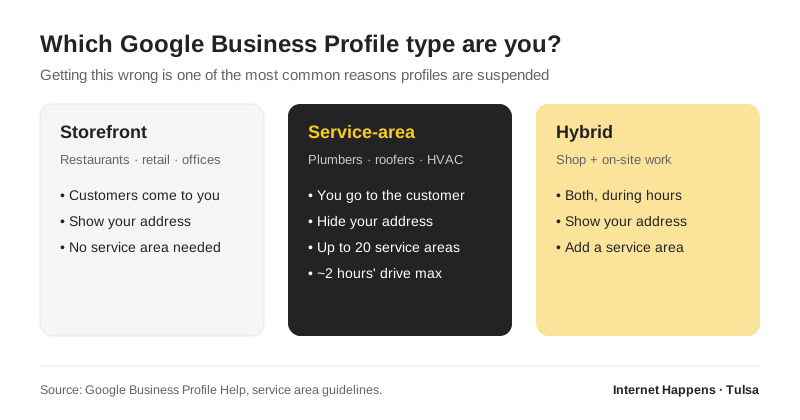
Step 1: Choose the Right Profile Type
Google treats businesses in three ways, and getting this right matters more than almost anything else:
- Storefront businesses serve customers at their location -- restaurants, retail, salons, offices clients visit. Show your address.
- Service-area businesses go to the customer -- plumbers, roofers, HVAC, cleaners, mobile services. If you don't serve customers at your address, Google's guidelines say to remove the address and list a service area instead. Showing a home address when customers don't come there is one of the most common reasons profiles get suspended.
- Hybrid businesses do both -- say, a shop customers can visit that also does on-site work. Show both the address and a service area.
Setting a Tulsa-area service area
According to Google's service area guidelines, you can list up to 20 service areas by city, ZIP code, or region, and your overall area shouldn't extend much more than about two hours of driving from where you're based. You can't add whole states or countries. For a Tulsa-based business, that usually means the cities you actually serve -- Tulsa, Broken Arrow, Owasso, Jenks, Bixby, Sand Springs, Sapulpa, Glenpool, Claremore, and so on. List where you genuinely work, not everywhere you'd theoretically drive.
Step 2: Get the Basics Exactly Right
- Business name: your real name, exactly as it appears on your signage and paperwork. Adding keywords -- "Smith Roofing | Tulsa Roof Repair" -- violates Google's guidelines and is a leading cause of suspensions.
- Primary category: the single most specific category that describes what your business is. "Roofing contractor," not "Contractor." This is one of the strongest signals Google uses to match you to searches.
- Secondary categories: add only for services you genuinely provide.
- Phone number: a local number that matches your website. If you use call tracking, set it up carefully -- see how to track phone calls from your website.
- Website: link to your homepage, or to the matching location page if you have several locations.
- Hours: accurate regular hours, plus special hours for holidays. Few things frustrate customers faster than showing up to a closed door that Google said was open.
Step 3: Verify the Profile
Google needs to confirm you're a real business at a real location. Verification methods vary -- today many businesses are asked to record a short video showing their signage, workspace, and proof of management. Plan for it: have your signage visible, your equipment or storefront ready to show, and business documents handy. Unverified profiles won't show up properly, and editing key details can trigger re-verification, so get your information right before you start.
Step 4: Fill Out Everything Google Offers
- Description: a plain-English summary of what you do, who you serve, and where. Write it for customers, not for keywords. Don't include links or promotional gimmicks.
- Services or products: list them individually with short descriptions. This helps both customers and Google understand exactly what you offer.
- Photos: real photos of your team, your work, your vehicles, your storefront, and your signage. Stock photos add nothing. Recent photos show you're active.
- Attributes: relevant options like wheelchair accessibility, online appointments, or on-site services.
- Posts: short updates about offers, events, or recent projects keep your profile fresh and give customers another reason to call.
Step 5: Build a Steady Review Habit
Reviews are where local businesses win or lose the map. Two businesses with similar profiles sit side by side, and the one with more recent, detailed reviews usually gets the call. Recency matters as much as the total -- a burst of reviews three years ago looks weaker than a steady trickle every month.
What works:
- Ask every customer, at the moment they're happiest -- right after a job well done.
- Make it easy with a direct review link by text or email, or a QR code at the counter.
- Reply to reviews, good and bad. A calm, professional response to a negative review often impresses future customers more than the complaint hurts you.
What's not allowed: Google prohibits offering discounts, gifts, or anything else in exchange for reviews, and it doesn't allow asking only happy customers while steering others away. Fake reviews are also illegal under the FTC's rule banning fake reviews and testimonials. It's not worth the risk.
Step 6: Keep It Consistent Everywhere
Google cross-checks your profile against your website and other listings -- Bing Places, Apple Business Connect, Facebook, Yelp, industry directories. AI tools like ChatGPT and Google's AI Overviews do the same. When your name, address, phone, and hours match everywhere, you look trustworthy. When they don't, you lose ground, and AI tools may repeat the wrong information. My 30-minute AI visibility self-audit includes a quick way to catch mismatches.
Mistakes That Get Profiles Suspended
| Mistake | Why it's a problem |
|---|---|
| Keywords stuffed in the business name | Violates Google's guidelines; competitors can report it |
| Showing an address customers don't visit | Service-area businesses must hide their address |
| A virtual office or mailbox as your location | Google requires a real, staffed location |
| Duplicate profiles for the same location | Splits your reviews and can trigger suspension |
| Incentivized or fake reviews | Violates Google policy and FTC rules |
| Frequent major edits to name, address, or category | Can trigger re-verification or review |
Step 7: Check In Monthly
Set a monthly reminder to spend fifteen minutes on your profile: reply to new reviews, add a few new photos, publish a post, check that your hours are right, and look at the performance data Google provides -- how many people called, requested directions, or visited your website from your profile. It's one of the highest-return fifteen minutes in local marketing.
Want Help?
Google Business Profile setup and management is a core part of my Tulsa SEO services. Whether you're starting from scratch, cleaning up a suspended profile, or trying to climb into the map results, you'll work directly with me -- no agency layers, no markup. And if you'd like to know how your profile fits into the bigger picture, start with the complete guide to online visibility for local businesses.