The short version: Write down the questions your customers actually ask, run them through Google's AI results, ChatGPT, Perplexity, Gemini, and Copilot, and record whether your business is named, whether it's linked, and whether the facts are right. Then check that the crawlers these tools rely on can actually reach your site. It takes about 30 minutes, costs nothing, and tells you more than most paid "AI visibility" reports.
It's one of the most common questions I hear from business owners right now: "If somebody asks ChatGPT for the best company like mine in Tulsa, do we even come up?" Usually it's followed by a story about a relative or a customer who tried it -- and got a competitor's name instead.
It's a fair concern, and the only honest way to answer it is to test. AI answers vary from person to person and day to day, so a single screenshot doesn't prove much. But a structured check, repeated monthly, will show you a real pattern. Here's the exact process I use, simplified so you can do it yourself.
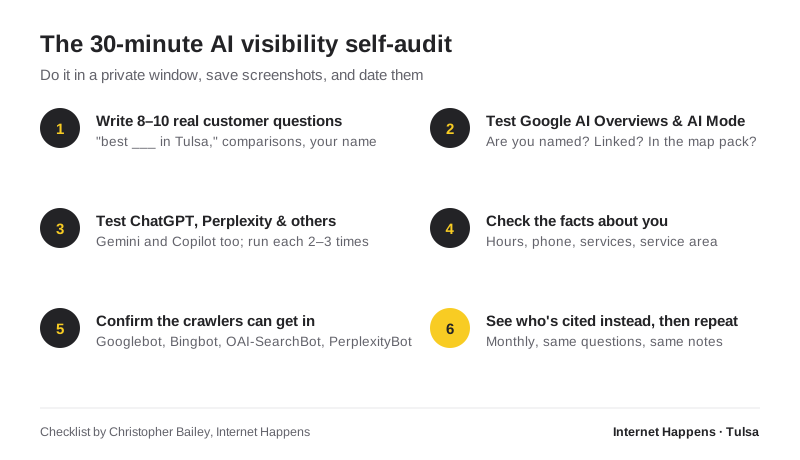
Before You Start: Set Up a Fair Test
- Use a private or incognito window, and stay logged out where you can. Your own search history and location will otherwise tilt the results in your favor.
- Run each question two or three times. AI tools don't give identical answers every time. You're looking for patterns, not one-off wins.
- Take dated screenshots. Next month you'll want to compare, and memory is unreliable.
- Keep a simple spreadsheet: question, tool, date, whether you were mentioned, whether you were linked, whether the facts were accurate, and who was mentioned instead.
Step 1: Write 8–10 Real Customer Questions
This is the step most people rush, and it's the most important. Don't test the phrases you wish customers used. Test the way they actually talk -- ask your front desk, look at your contact form submissions, and think about what people say on the phone. Aim for a mix:
- Discovery questions: "Who's the best roofer in Tulsa?" or "Recommend a family law attorney in Broken Arrow."
- Problem questions: "My AC is blowing warm air -- who should I call in Tulsa?" People often describe the problem, not the service.
- Comparison questions: "Is it better to repair or replace a 15-year-old water heater?" The businesses cited for these build trust before the customer ever picks up the phone.
- Branded questions: "What do you know about [your business name]?" and "Is [your business name] any good?" This shows you what AI actually believes about you.
Step 2: Test Google's AI Overviews and AI Mode
Search each question on Google. For each one, note whether an AI Overview appears, whether your business is mentioned in it, and whether your website is one of the linked sources. Then try the same question in AI Mode. Google says the two may use different models and techniques, so it's normal for the results to differ.
While you're there, note whether you appear in the map pack for local questions. Your Google Business Profile still carries enormous weight for local searches, AI or not.
One useful detail: Google counts appearances in AI Overviews and AI Mode as part of your regular search traffic in Search Console's Performance report. There's no separate "AI" report there, but if you're verified in Search Console, those impressions and clicks are already being counted.
Step 3: Test ChatGPT, Perplexity, Gemini, and Copilot
Ask the same questions in each tool. In ChatGPT, make sure it's actually searching the web for current information rather than answering from memory -- you'll usually see sources listed when it is. For each answer, record:
- Were you named?
- Were you linked as a source?
- Was what it said about you accurate?
- Who was named instead of you, and what sources were cited for them?
That last point is the gold. It shows you exactly where these tools are getting their information in your market.
Step 4: Check the Facts About Your Business
The branded questions from Step 1 matter here. If an AI tool lists the wrong hours, an old phone number, a service you stopped offering, or a city you don't serve, it's almost always repeating outdated information from somewhere on the web -- an old directory listing, a stale social profile, or an inconsistent Google Business Profile.
Fixing those sources is one of the most effective things you can do. Make sure your name, address, phone number, hours, and services match exactly on your website, Google Business Profile, Bing Places, Apple Business Connect, Facebook, and the major directories in your industry.
Step 5: Make Sure the Crawlers Can Get In
This one is technical, but it's quick to check and it's surprisingly common to get wrong. Open yourwebsite.com/robots.txt in a browser and look for any rules that block these crawlers:
| Crawler | Who runs it | What it affects |
|---|---|---|
| Googlebot | Google Search, including AI Overviews and AI Mode | |
| Bingbot | Microsoft | Bing and Microsoft Copilot search results |
| OAI-SearchBot | OpenAI | Whether your site can appear in ChatGPT search answers |
| PerplexityBot | Perplexity | Perplexity's search index |
| GPTBot | OpenAI | AI model training only -- separate from search |
A few things worth knowing:
- OpenAI is explicit about this: according to its crawler documentation, sites that opt out of OAI-SearchBot won't be shown in ChatGPT search answers. Blocking GPTBot, on the other hand, only affects model training -- you can make those two decisions independently.
- Google-Extended won't remove you from AI Overviews. It's a control for Gemini training and grounding, and Google states it doesn't affect inclusion or ranking in Google Search. AI Overviews and AI Mode are governed by normal Googlebot access.
- Check your firewall, too. Some hosting companies and security services block unfamiliar bots automatically, even when your robots.txt allows them. If your site sits behind a bot-protection service, look at its settings.
While you're at it, confirm that your key pages are actually indexed. Google Search Console and Bing Webmaster Tools are both free and will tell you. If a page isn't indexed, no AI tool that relies on search will find it.
Step 6: Study Who Gets Cited Instead -- Then Repeat
Look at your notes from Steps 2 and 3. When a competitor is recommended, what sources are cited? You'll usually see a mix of their own website, review platforms, local news, "best of" roundups, industry directories, and community discussions. Pew Research Center's study of Google's AI summaries found that Wikipedia, YouTube, and Reddit were among the most frequently cited sources overall -- a reminder that AI leans heavily on what the broader web says, not just what you say about yourself.
That's your roadmap. If every recommended competitor has recent reviews on a particular platform, a mention in a local publication, or a strong answer page for a common question, those are the gaps to close.
Then run the same questions again next month. The value of this audit is in the trend.
Bonus: Watch for AI Referral Traffic in Google Analytics
Some AI traffic is measurable. Links clicked in ChatGPT often carry a utm_source=chatgpt.com tag, and Perplexity visits usually arrive with perplexity.ai as the referrer, so in GA4 you'll see them as session sources. Not every AI visit is tracked -- some arrive with no referrer at all and land in "Direct" -- but the trend line is still useful. If you want a cleaner view, you can create a custom channel group in GA4 that groups these sources together as "AI."
What to Do With Your Results
Your results will usually fall into one of three patterns:
- You're not mentioned anywhere. Start with the foundation: technical SEO, a complete Google Business Profile, and service pages that clearly answer real questions. I explain how these pieces relate in AIO vs. GEO vs. SEO.
- You're mentioned, but with wrong information. Clean up your business listings everywhere. Consistency is the fix.
- You're mentioned sometimes, but competitors are mentioned more. Compare the sources cited for them against your own presence. Reviews, local mentions, and genuinely useful content usually close the gap.
If you'd like help interpreting what you find, this is exactly the kind of work I do through my AI Optimization and GEO services -- starting with a free look at where you stand. You'll work directly with me, not an account manager.