The short version: This year I rebuilt internethappens.com from a WordPress site running a page builder into a lean, hand-coded PHP site with no plugins and no database. The speed scores barely changed. What changed was everything else: far fewer moving parts to patch, full control over every line of code, and a site that's easier for search engines and AI tools to read. It was the right call for my site. It isn't the right call for everyone -- and I'll tell you which camp you're probably in.
I build websites on WordPress, in hand-coded HTML and PHP, and on other platforms -- whichever is genuinely the best fit for the client. WordPress is still the right answer for a lot of them. So when I tell people I moved my own website off WordPress this year, the first question is usually, "So is WordPress bad now?"
No. But the reasons I moved -- and the results -- are a useful look at the trade-offs every business owner is making, whether they know it or not. Here's the honest story, including the part where one of my scores went down.
What I Was Running Before
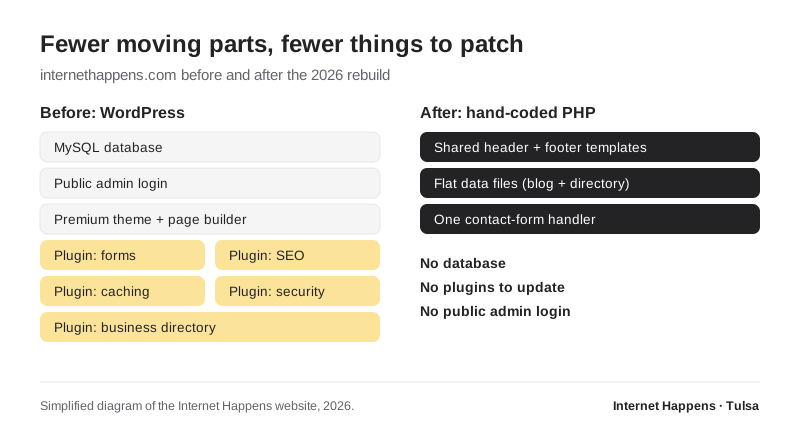
My old site was a typical professional WordPress build: a premium theme with a drag-and-drop page builder, a set of plugins for forms, SEO, caching, security, and a business directory, plus a MySQL database holding everything together. It worked. After a round of performance tuning, it scored well in Google's Lighthouse testing -- 90 on mobile performance, 98 on desktop, 95 for accessibility, and 100 for both best practices and SEO.
Plenty of businesses would be thrilled with those numbers. So why change anything?
Why I Moved
1. Every plugin is something to patch
WordPress core itself has an excellent security record. The risk lives in the ecosystem around it. Patchstack's State of WordPress Security in 2026 report counted 11,334 new vulnerabilities in the WordPress ecosystem during 2025 -- up 42% from the year before -- with 91% of them in plugins and only six in WordPress core. Patchstack also found that among the most heavily targeted flaws, the median time from public disclosure to mass exploitation was about five hours.
That doesn't mean a WordPress site is unsafe. It means a WordPress site needs someone watching it. For my own site, I realized I was maintaining a lot of moving parts to deliver pages that barely change.
2. I wanted control over every line
Page builders are wonderful for letting non-developers edit layouts. The cost is markup you don't fully control -- extra wrappers, scripts, and styles loaded because the builder might need them. I edit my own site in code anyway, so the editing interface was solving a problem I didn't have.
3. I wanted to practice what I preach about AI search
I've been writing about how AI tools like Google's AI Overviews and ChatGPT read websites. Clean, semantic HTML with a sensible heading structure, honest structured data, and fast responses is exactly what those tools handle best. Rebuilding by hand let me get all of that right from the ground up -- including an llms.txt file, which helped the new site earn a perfect score on Lighthouse's newer agent-readiness checks.
How I Did It Without Losing Search Rankings
This is the part that matters most to anyone considering a rebuild. A redesign that changes URLs carelessly can wipe out years of search visibility. Here's the plan I followed:
- Every URL stayed exactly the same. Every page, every blog post -- including articles going back to 2010 -- and every business directory listing kept its original address. No redirects needed for existing pages.
- Titles and meta descriptions were copied from the live site, not rewritten from scratch, so nothing Google already trusted changed overnight.
- The new site was built and tested in a staging folder that search engines were told not to crawl, then moved into place only once every live page had an equivalent.
- Same analytics, same Search Console property. Tracking continued without a gap.
- A custom 404 page logs every miss, so any old link I overlooked shows up in a dashboard and can be redirected.
- A full backup of the WordPress site was taken before anything was switched off.
If you're planning any kind of website move -- new platform, new designer, new domain -- this list is worth printing out.
The Results, Honestly
| Lighthouse score | WordPress (after tuning) | Hand-coded (at launch) |
|---|---|---|
| Performance -- mobile | 90 | 86 |
| Performance -- desktop | 98 | 98 |
| Accessibility | 95 | 100 (after a contrast fix) |
| Best practices | 100 | 100 |
| SEO | 100 | 100 |
Yes, mobile performance dipped a few points at launch. Lab scores like these swing a few points from test to test, so I don't read much into a four-point difference -- but I'm not going to pretend it isn't there. Speed was never the main reason for the move -- the old site was already fast, which is a good reminder that a well-maintained WordPress site can perform very well.
What actually improved:
- Accessibility reached 100 once an audit caught low-contrast footer text. (Every link and button also got proper descriptive titles.)
- No plugins to update, no database to protect, no admin login to attack.
- Features I actually wanted, built exactly how I wanted them: a private dashboard showing contact-form submissions and 404 errors, scheduled blog publishing, automatic sitemap generation, and instant search engine notifications through IndexNow.
- Reliable contact-form email. My host blocks the standard outgoing mail port, so form messages now go through a dedicated transactional email service -- something I'd been working around with plugins before.
Should You Move Off WordPress?
Probably not -- and I say that as someone who just did. Here's how I'd think about it:
| Stay on WordPress if... | A lean custom build may fit if... |
|---|---|
| Staff need to edit pages and publish posts themselves | Changes are infrequent and handled by your web person |
| You publish content often or run a large blog | Your site is mostly service pages that rarely change |
| You need e-commerce, memberships, or bookings off the shelf | Your needs are simple and well-defined |
| You want the flexibility to switch developers easily | You have a long-term relationship with a developer you trust |
That last row matters. With WordPress, thousands of developers can pick up where someone else left off. A custom build depends more on the person who built it. That's a fine trade when you have the right relationship -- and a real risk when you don't.
For most businesses, the better move is tightening WordPress rather than leaving it: fewer plugins, a lighter theme instead of a heavy page builder, good hosting, regular updates, and someone actually monitoring it. That alone solves most of the problems that pushed me to rebuild.
The Real Lesson
The platform matters less than the discipline behind it. A lean WordPress site that's maintained beats a neglected custom site every time, and the reverse is true too. What I'd encourage every business owner to know is what their site is actually built on, what it costs to keep healthy, and who's responsible for it.
If you're weighing a rebuild -- WordPress or otherwise -- and want a straight answer about what makes sense for your business, that's exactly what I do through my Tulsa website design work. And for the bigger picture of what a modern site needs in 2026, see Modern Website Design Techniques for 2026.